

If your website runs on WordPress (and it probably does — the CMS powers a huge slice of the web), security isn’t optional. A single vulnerable plugin or a weak admin password can turn months of work into a compromised site, bad SEO, and frantic damage control. This post walks through the real vulnerabilities that bite WordPress sites, why they happen, and practical, layered solutions you can apply today — informed by industry reports and practical hardening guidance. Wordfence+1
Quick Comparison: Common wordpress security vulnerabilities vs. practical solutions
| Vulnerability (what attackers exploit) | Why it happens | Quick fix (practical) |
|---|---|---|
| Outdated plugins & themes | Developers stop updating; site owners delay updates | Audit active plugins, remove unused ones, update promptly; subscribe to vulnerability feeds (WPScan/Wordfence). WPScan+1 |
| Broken access control / weak credentials | Default usernames, reused passwords, no MFA | Enforce strong passwords, remove admin user, enable 2FA and least-privilege roles |
| Insecure configuration (file permissions, debug enabled) | Convenience during dev → left in production | Harden wp-config.php, set correct file permissions, disable debug/display errors |
| Injection (XSS, SQLi) | Unfiltered input in plugins/themes or custom code | Use parameterized queries, sanitize outputs, rely on vetted libraries |
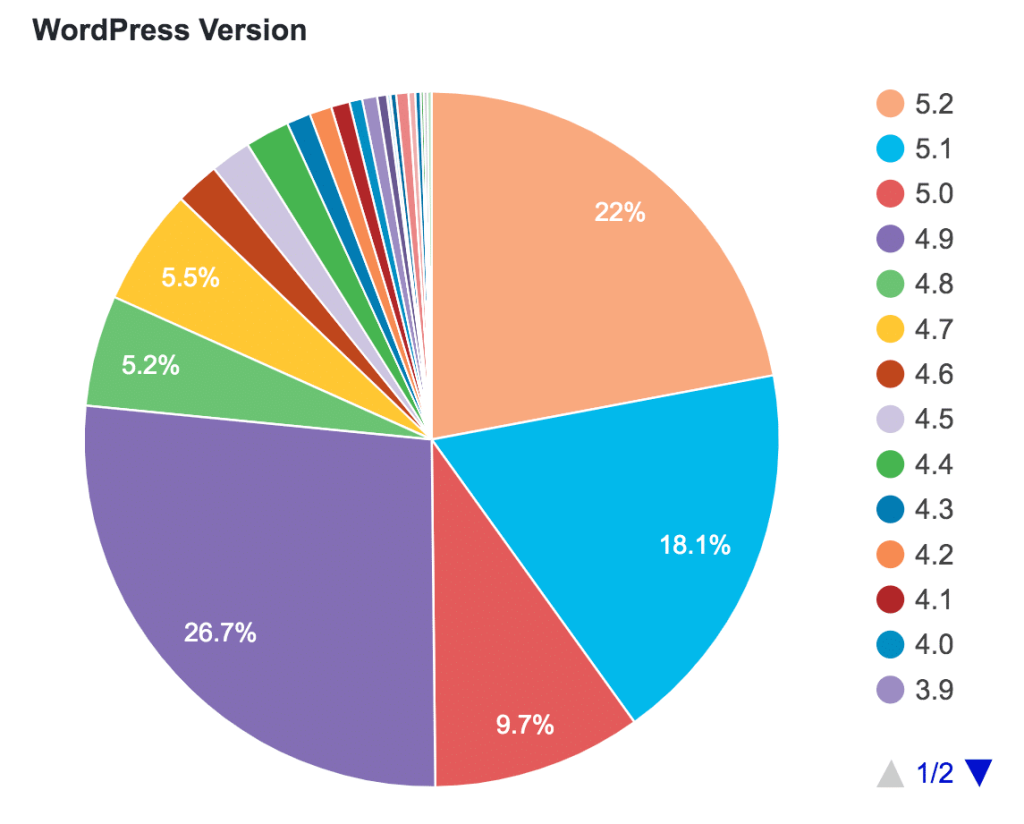
| Unpatched core vulnerabilities | Slow upgrades on production sites | Keep WP core updated or use managed hosting that patches for you |
| Malware/backdoors | Compromised credentials or vulnerable plugins | Regular malware scans & file integrity checks; restore from clean backups |
The real landscape — facts that matter
Two patterns keep repeating in WordPress security telemetry: (1) the majority of actionable vulnerabilities stem from third-party code (plugins/themes) and (2) many disclosed vulnerabilities remain unpatched on live sites — making them prime targets. Security vendors and vulnerability databases (WPScan, Wordfence) catalog this in real time; paying attention to those feeds and the official WordPress hardening guide will save you grief. WPScan+2Wordfence+2
Deep dive: the most dangerous attack vectors and how to stop them
1. Vulnerable plugins and themes (the biggest single risk in wordpress security)
Why: Plugins add powerful features but also expand attack surface. A poorly coded plugin can introduce SQL injection, file upload flaws, or privilege escalation.
How to defend:
- Use only well-maintained plugins with active support and high review counts. Scan plugin changelogs for security fixes.
- Remove unused plugins and themes completely — don’t just deactivate.
- Subscribe to vulnerability alerts (e.g., WPScan, Wordfence Intelligence) and act fast when a CVE is published. WPScan+1
2. Weak or misconfigured authentication in wordpress security
Why: Brute force, credential stuffing, and social engineering target weak logins.
How to defend:
- Enforce unique, complex passwords and use a password manager.
- Implement two-factor authentication (2FA) for all admin users.
- Limit login attempts and consider blocking login access by IP or implementing a VPN to access wp-admin for high-security sites.
3. Broken access control & privilege creep affecting wordpress security
Why: Overly-broad user roles and forgotten admin accounts allow attackers to move laterally after initial compromise.
How to defend:
- Apply the principle of least privilege: give users only the permissions they need.
- Regularly audit users, remove stale accounts, and rotate credentials after role changes.
4. File upload & remote code execution bugs threatening wordpress security
Why: Plugins or forms that accept files without validation can lead to PHP shells.
How to defend:
- Restrict allowed file types, scan uploads, and store uploads outside the web root where possible.
- Disable executable flags in upload directories and keep PHP execution out of
/wp-content/uploads.
5. Security misconfiguration (hosting, HTTP headers, TLS) within wordpress security
Why: Insecure servers/configs are easy wins for attackers.
How to defend:
- Use modern TLS (HTTPS), enable HSTS, and harden HTTP security headers (CSP, X-Frame-Options, X-Content-Type-Options).
- Choose hosts that isolate accounts (no shared root) and provide web application firewalls (WAF).
Practical “defense-in-depth” WordPress Security Vulnerabilities checklist (what I actually do on client sites)
- Automated backups + tested restores — daily offsite backups (not just plugin-based), and I test restores quarterly.
- Staging environment — test plugin/theme updates on staging before applying to production.
- Managed scanning — scheduled malware scans & integrity checks (file hashes).
- WAF + CDN — block common attacks before they hit PHP; benefits include rate-limiting and bot mitigation.
- Least privilege + 2FA — every account audited monthly.
- Monitoring & incident plan — alerts for unusual file changes, new admin users, or mass login failures; an incident playbook is ready.
These measures won’t make you invincible, but they convert a single vulnerability into an actionable event you can contain rather than a full site takeover. For practical hardening steps, the official WordPress hardening guide is a great starting point. WordPress Developer Resources
Tools & resources I recommend to check wordpress security Vulnerabilities (and why)
- WPScan — vulnerability database & scanner for WordPress plugins/themes. Great for proactive checks. WPScan
- Wordfence / Sucuri — endpoint and cloud-based options for firewall and malware scanning; they publish timely vulnerability reports. Wordfence+1
- Official WordPress Hardening Guide — authoritative checklist for file permissions,
wp-config.phphardening, and more. WordPress Developer Resources - OWASP Top 10 — if you’re customizing code, align your secure coding practices with OWASP guidance (injection, XSS, broken access control are all relevant). Cloudflare
Example: a realistic update policy (so you don’t procrastinate)
- High-severity patch window: 24–72 hours for core or plugin patches that fix RCE/XSS bugs.
- Routine updates: weekly for maintenance updates; monthly for deeper audits.
- Staging-first rule: test updates in staging (automated snapshot) before production.
This cadence helps keep patch debt low — Wordfence data shows a meaningful portion of disclosed vulnerabilities remain unpatched across the web, so timeliness matters. Wordfence
Table: Fast reference — wordpress security Vulnerabilities → immediate action
| Vulnerability | First 24 hours | Follow-up |
|---|---|---|
| Critical plugin RCE | Patch plugin or disable; restore from clean backup if compromised | Replace plugin with maintained alternative |
| Admin credential leak | Force password reset for all admins; rotate keys | Audit logs; enable 2FA |
| Unexpected file changes | Quarantine site offline; compare with last good backup | Malware scan; forensic review |
Conclusion — treat security like maintenance, not panic
WordPress security is a marathon, not a sprint. The most effective approach blends automation (backups, scans, WAF), good habits (updates, 2FA, principle of least privilege), and attention to signals (watch vulnerability feeds and your logs). Use the resources linked above to build a habit-driven security posture rather than a one-off cleanup operation. WordPress Developer Resources+1

